
How to Track Press Release Syndication: A Practical 2026 Guide

A search result isn’t proof that your press release reached a new audience. Learning how to track press release syndication means checking whether each result is a genuine republication, a duplicate or an unrelated page, then recording what the evidence shows.
If you’ve received a distribution report or searched for your release online, you may already know how confusing the results can be. A long list of links doesn’t show how many distinct outlets republished the release, and it doesn’t mean journalists produced independent coverage.
This guide explains how to find and verify syndication placements, assess the evidence and maintain a reliable tracking record. You’ll learn how to distinguish republication from original reporting and other campaign responses, so your conclusions are based on more than pickup counts.
We’ll cover a practical verification process, the details to capture in a tracking log and how to use those records to inform future distribution decisions. A structured pickup report, such as the report Newswire Now Media Group provides within 48 hours, can give you a useful starting point.
Key Takeaways
- Learn how to track press release syndication with a repeatable search, verification and logging workflow.
- Classify results by comparing wording, bylines, source attribution and signs of added reporting.
- Use consistent log fields to identify duplicate URLs and distinguish accessible publication pages from incomplete results.
- Separate republication from journalist enquiries, social mentions and original editorial coverage when reviewing campaign response.
- Combine your own checks with a pickup report to create a clearer evidence base for future distribution decisions.
What press release syndication tracking can, and cannot, show
Syndication tracking means finding and recording outlets that republish press release content. A useful working definition is: syndication tracking verifies where release content appeared and records the evidence. It helps you confirm publication, not assume impact. A Press release communicates an announcement to media and other audiences; tracking looks for evidence that this material appeared elsewhere.
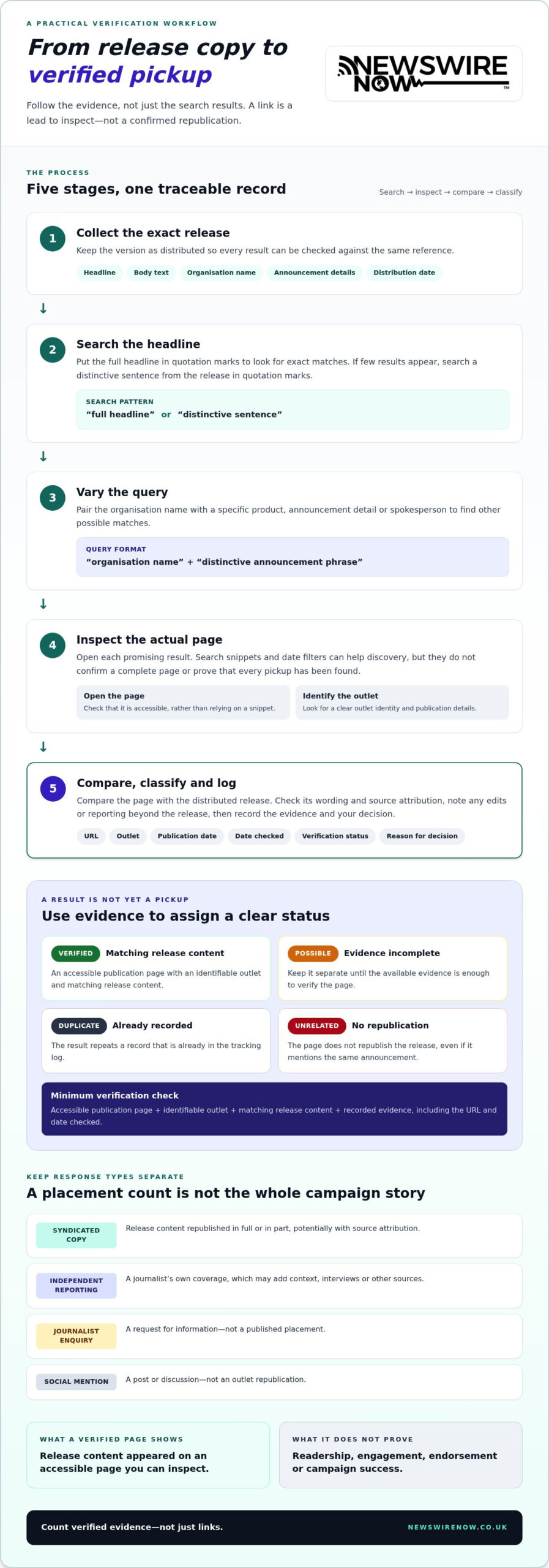
Search results can show several kinds of response. A syndicated copy reproduces release content. Independent reporting is a journalist’s own coverage, which may add context, interviews or other sources. A journalist enquiry is a request for information, not a published placement. A social mention is a post or discussion, not an outlet republication. Record each type separately.
What counts as a press release pickup?
A pickup may reproduce the full release, publish a shortened version or carry wire copy with source attribution. Before counting a result, open the page and compare its text with the release. Check the outlet name, page, wording and any source credit. A search snippet, broken link or page that only mentions the same announcement isn’t enough to verify republication. An outlet copying the release is also different from a journalist independently reporting on the announcement.
What tracking results cannot prove
A live URL shows that content appeared on a page you can access. By itself, it doesn’t show how many people read it, whether they engaged or whether the outlet endorses the claims. Those conclusions require separate evidence, such as available audience or referral data. Don’t infer them from a placement alone.
Search visibility can change. Pages may move, disappear or stop appearing in results, and indexing can vary over time. Record the date you checked each page and what you verified, rather than treating one search as a permanent record. A URL count can also exaggerate reach when several pages reproduce the same copy. Neither a high pickup count nor a visible placement, by itself, proves campaign success or earned media coverage.
In practice, how to track press release syndication starts with separating verified republication from other responses, then recording precisely what each result demonstrates. This gives you a credible evidence base without overstating readership, editorial interest or campaign value.
How to track press release syndication step by step
A consistent search process makes how to track press release syndication easier to apply across campaigns. Keep a copy of the release as distributed, including its headline and final wording. This gives you a reliable reference when comparing results, particularly if the release was edited before distribution. For context on effective release structure, see the PRSA Guide to Writing Press Releases.
Find possible syndication pages efficiently
Work through these discovery steps in order. Treat search results as leads to inspect, not verified placements.
- 1. Collect the release. Save the exact headline, body text, organisation name, announcement details and distribution date.
- 2. Search the headline. Put the full headline in quotation marks to look for exact matches. If few results appear, search for a distinctive sentence from the release in quotation marks.
- 3. Vary the query. Pair the organisation name with a specific product, announcement detail or spokesperson. For example: “organisation name” “distinctive announcement phrase”.
- 4. Inspect the results. Open each promising result rather than relying on its search snippet. Date filters can help narrow discovery, but they don’t establish that a page is complete or that every pickup has been found.
- 5. Verify and log. Compare the page with the distributed release, check the outlet and publication date, then record your evidence and classification.
Verify and document each result
Check whether the page is accessible and whether its content matches the release in full or in part. Look for attribution to a newswire or source, the outlet’s identity and a publication date. If details differ, note whether the page appears edited or includes reporting beyond the release. Don’t treat a search snippet, repeated result or page that merely mentions the announcement as a confirmed pickup.
For each result, record the search date, URL, outlet, publication date, verification status and a short reason for your decision. Use clear labels: verified for an accessible page with matching release content; possible when evidence is incomplete; duplicate when it repeats a record already logged; and unrelated when it doesn’t republish the release. These labels create a traceable record that you can review or update later.
Minimum verification checklist: “A verified pickup has an accessible publication page, an identifiable outlet, matching release content and recorded evidence, including the URL and date checked.” A structured press release pickup report can also give you a useful starting point for applying these checks.
Syndicated pickup or independent coverage? Classify results accurately
A result’s publisher doesn’t tell you how it was produced. An established news outlet can host syndicated release copy, while a smaller publication may carry original reporting. To classify a placement, compare the page with the release and look for evidence of additional journalism.
Classify coverage by its content and reporting, not merely by its outlet. Use this comparison to make consistent decisions:
| Signal | Syndicated copy | Edited republication | Independent editorial coverage |
|---|---|---|---|
| Wording | Matches the release closely, often word for word. | Core material remains, but wording or length has changed. | Uses original wording and develops the story independently. |
| Byline and attribution | May have no individual byline and may credit a wire or source. | May retain source attribution, even after edits. | Often names a journalist, though a byline alone isn’t proof. |
| Reporting | Release-style structure, quotes and claims are reproduced. | Release content is adapted, possibly with limited changes. | Adds interviews, other sources, context or journalist analysis. |
| Link to release | May link to or identify the original source. | May retain a source link or attribution. | May link to the release, but the article stands as original reporting. |
Signs a page is syndicated release copy
Look for matching paragraphs, identical quotes, the same release-style order of facts and clear source attribution. A page that trims the introduction or adjusts the headline can still be a republication if the central announcement and release material remain. Note substantial edits in your log rather than counting every version as identical or assuming that any change makes it independent coverage.
When a result indicates independent editorial coverage
Check whether the article includes original interviews, additional sources, new context or analysis written by a journalist. A publisher hosting a release repost doesn’t make it earned editorial coverage, and a byline alone doesn’t establish independent reporting. If you can’t determine whether new journalism has been added, mark the result for review rather than forcing a definitive classification.
For how to track press release syndication accurately, keep separate records for syndicated copy, edited republication and independent coverage. This makes pickup totals more meaningful and prevents republication from being presented as original reporting. Include a brief reason for each classification, such as “release text reproduced with source credit” or “new interview and additional sources”.
Build a reliable syndication tracking log and interpret the evidence
A consistent log turns individual search results into a reviewable campaign record and helps prevent duplicates from inflating your pickup count. For each release, capture the title, outlet, page URL, publication date, date checked, verification status and evidence supporting your classification.
What to include in a campaign tracking record
Keep the record straightforward and repeatable. Include these core fields:
- Release title: the headline as distributed.
- Outlet and URL: the publication’s name and the direct page address.
- Dates: the publication date shown on the page, if available, and the date you checked it.
- Evidence and classification: a short note on matching text, attribution or added reporting, plus a label such as verified, possible, duplicate or unrelated.
Open the URL and confirm it leads to an accessible publication page, not just a search snippet or error page. Compare the page with the release and note why it qualifies as a pickup. If appropriate and permitted, save a dated screenshot or other evidence alongside the log. This makes later reviews more dependable if a page changes or disappears.
Check for duplicates before adding to your total. The same page may appear with different tracking parameters or URL variations, so compare the article content and outlet rather than counting each search result. Different pages carrying the same syndicated copy are separate publication records, but classify them as syndicated copies, not independent stories.
How to report findings without overstating impact
Keep verified placements separate from possible matches and independent editorial coverage. If a search finds no page, record that no result appeared on the date checked. Absence from search results isn’t definitive proof that publication didn’t occur: indexing and visibility can change, and a page may not appear for the queries you used.
Placement evidence shows where release content appeared. It doesn’t establish audience size, engagement, visits or conversions. Measure those separately where data is available. Referral analytics can identify visits from a publication, while campaign-tagged links can help distinguish traffic from other sources. Treat enquiries or conversions as separate outcomes, not conclusions drawn from a placement count.
For complementary post-publication activity, see this guide to amplifying news on social media. A structured press release distribution guide can also help connect distribution records with your review process. To put the evidence framework into practice, explore press release distribution and pickup reporting.
Use a pickup report to close the loop on your next release
A pickup report gives you a structured record to compare with your own checks. Treat it as a starting point: open listed pages, confirm the outlet and publication status, and record any differences between the report and what you can verify. Flag a URL that’s unavailable or doesn’t match the release for review instead of automatically counting it as a confirmed placement.
Review distribution evidence after publication
Once you’ve compared the report with accessible pages, organise the results to inform your next campaign. Group placements by outlet, relevant sector and status, such as verified, possible or inaccessible. Keep syndicated republications separate from independent editorial coverage. These categories describe what was published, not how many people read it.
Look for useful patterns. If verified placements appear in sectors relevant to your announcement, that can inform future targeting. If records repeatedly contain duplicates or inaccessible pages, refine your checks and the evidence you expect to see. Don’t treat missing search results as proof that distribution failed. Record what you checked and what remains unverified.
Choose a distribution process with transparent reporting
A documented process connects editorial review, distribution and post-publication reporting. Newswire Now distributes editorially reviewed releases through an independent network of more than 40 owned publications and to more than 500 trusted news outlets across 27 industry sectors and 37 professions. Its pickup report is provided within 48 hours, giving you a structured record to use alongside your own verification.
Newswire Now’s service includes guaranteed placements and a money-back guarantee. Keep those service commitments distinct from your assessment of each page: a pickup report records distribution results, while your checks establish what each accessible publication page shows. Used together, they support a clearer record for reviewing placements and shaping future distribution decisions.
If you’re planning your next release, Newswire Now’s distribution and reporting can provide a structured starting point for your review. Explore Newswire Now’s press release distribution and reporting to plan your next campaign.
Make your next campaign easier to measure
Reliable syndication tracking is about evidence, not inflated counts. Search the release headline and distinctive phrases, inspect each page, then log its URL, outlet, date and verification status. Classify republication separately from independent reporting, and keep possible matches distinct from confirmed placements.
These records show where release content appeared, but not who read it or what action they took. Use referral or campaign analytics to assess visits and conversions separately, then review the findings to refine future distribution and measurement criteria. That’s the practical value of knowing how to track press release syndication: clearer reporting and better-informed decisions for your next release.
Newswire Now distributes releases to more than 500 trusted news outlets and provides a pickup report within 48 hours to support your placement review. Explore press release distribution and reporting to put a structured reporting process behind your next campaign. Consistent checks and clear records help you assess each campaign and improve your approach.
Frequently Asked Questions
How do I track press release syndication?
Track press release syndication by searching for the exact headline and distinctive phrases, then checking each result against the release you distributed. Open the page, confirm the outlet and publication date, compare the wording and note any source attribution. Record the URL, date checked, evidence and classification in a tracking log. Keep verified republications separate from possible matches, duplicate pages and independent reporting so your placement count is clear and defensible.
How can I tell whether an article is syndicated or independently written?
Compare the article’s wording and structure with your release. Matching paragraphs, identical quotes, a release-style format and wire attribution point towards syndication, even if the outlet has shortened or lightly edited the copy. Independent coverage is more likely to include original interviews, additional sources, new context or journalist analysis. A byline alone doesn’t prove independent reporting. If the evidence is unclear, mark the result for review rather than assigning a definite category.
How long does it take for a press release to appear in search results?
There isn’t one reliable timeframe for a release or pickup to appear in search results. Timing can vary between pages and search engines, and a published page may not be indexed or easy to find straight away. Search for the headline and distinctive wording more than once, noting the date of each check. A missing result doesn’t prove that publication hasn’t occurred, so use a distribution report and direct page checks as additional evidence.
Can I track press release syndication without specialist software?
Yes. You can start with a saved copy of the release, searches for its quoted headline and distinctive phrases, and a spreadsheet or document to record results. For each page, capture the outlet, URL, publication date, date checked, evidence and classification. Open results to verify their content rather than relying on snippets. Specialist monitoring tools can support broader tracking, but a consistent manual process is enough to build a useful record for an individual release.
What should a press release pickup report include?
A useful pickup report should identify publication pages so you can review and verify them. Capture the release title, outlet, URL, publication date where available, and evidence or status for each result. Separate confirmed pages from possible matches, duplicates and independent coverage. Newswire Now provides a pickup report within 48 hours. Use it as a starting point, then check accessible pages yourself; a placement record doesn’t establish readership, engagement or campaign outcomes.
Does press release syndication mean a journalist has covered my story?
No. Syndication means an outlet has republished release content, either in full or in an edited form. That’s different from independent editorial coverage, where a journalist adds original reporting, such as interviews, other sources or analysis. A release appearing on a publisher’s website doesn’t, by itself, show that a journalist investigated or endorsed the announcement. Report syndicated pickups and original coverage separately to avoid overstating earned media results.
Why can’t I find every press release pickup in a search engine?
Search engines don’t necessarily show every published page. A result may be hard to discover because its wording differs from your search, it hasn’t been indexed, or its visibility has changed. Pages can also become inaccessible or appear under duplicate URLs. Try exact headline searches, distinctive phrases and organisation-name combinations, then compare results with your pickup report. Record what you checked and when; no search results means unverified, not proof that a pickup never happened.
Ready to get your story published?
Distribute your press release across 500+ trusted media outlets — with editorial review and a full pickup report within 48 hours.
Send Press Release →