
How to decide what to include in a press release

What if the press release footer is where a journalist finds the detail needed to follow up? To decide what to include in a press release footer, use the Notes to Editors section at the end for your company boilerplate and contact information. Include a contact name, telephone number and email address, and keep the boilerplate to one or two sentences.
It’s easy to focus on the headline and main story, but the closing details also need to be clear and useful. Put background or technical information in the Notes to Editors section, keeping supporting material together without interrupting the news.
This guide explains what belongs in each part of a press release, how to format it for quick reading, and where to place contact details and background links. You’ll be able to structure the release so journalists can understand the story first, then find the information they need to follow up.
Key Takeaways
- Build the release around the news, with the most important information easy to find at a glance.
- Keep the copy concise and use a clear layout so journalists can scan it quickly.
- Separate follow-up contacts from supporting material, placing each where it’s easiest to use.
- When your release is ready to reach media outlets, consider distribution and editorial review to support its presentation and pickup tracking.
What to include in a press release?
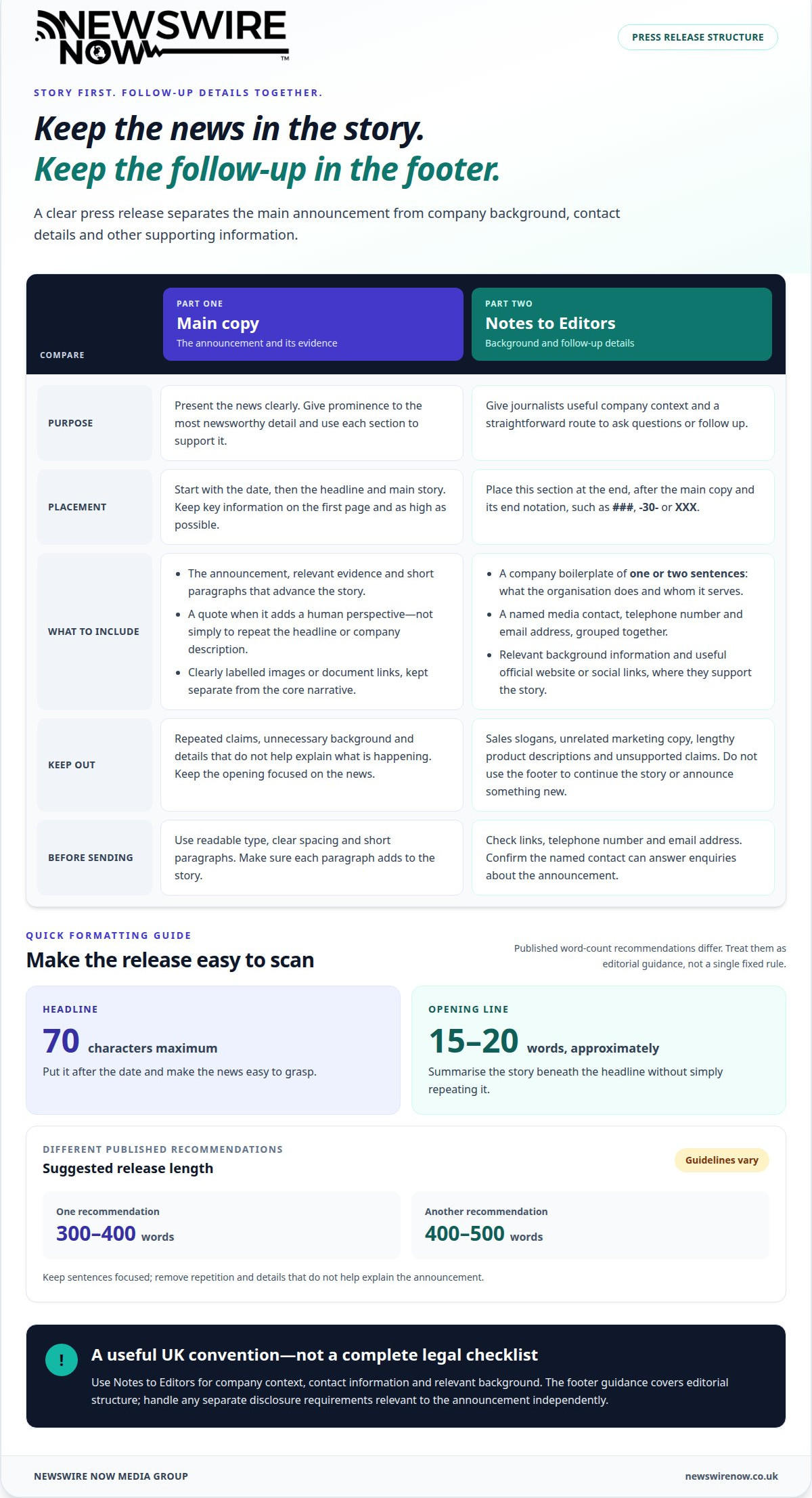
Use four steps to keep the story, company synopsis and contact details clear. Place the Notes to Editors section at the end, after the main copy.
-
Add a company synopsis
Write a short boilerplate that identifies the company and explains its work. Keep it to one or two sentences, using the company’s established description rather than promotional claims. State what the organisation does and whom it serves. Put this synopsis in the Notes to Editors section, where journalists can find background without interrupting the story’s opening.
-
Provide contact information
Put the media contact details in the footer so journalists can follow up. Include a named contact, telephone number and email address. Choose someone who can answer questions about the announcement, rather than a general department with no clear point of contact. Group the details beneath the company synopsis and make each one easy to scan.
-
Follow UK footer conventions
Use the Notes to Editors section at the end for the boilerplate, contact information and relevant background. This is a practical convention for UK press releases, not a complete legal checklist. The footer guidance covers editorial structure; handle any separate disclosure requirements relevant to your announcement independently. Keep the section distinct from the main copy so journalists can find supporting details quickly.
UK footer conventions focus on clear company context and a usable contact route. Keep these elements consistent across releases, and avoid using a second, conflicting format for the same details.
-
Exclude unsuitable footer content
Remove material that doesn’t help journalists understand the organisation or follow up on the story. Avoid sales slogans, unrelated marketing copy, lengthy product descriptions and unsupported claims. Put the news in the main paragraphs, not the company synopsis. If images or extra documents need explanation, identify them clearly rather than crowding the footer with promotional text.
Press release length and formatting
- Set a clear length before drafting. Published recommendations vary: one suggests 300 to 400 words, while another suggests 400 to 500 words. Treat these as differing editorial guidelines, not a single fixed rule. Keep each sentence focused on the announcement, and remove repeated claims, background already covered elsewhere and details that don’t help explain what’s happening.
- Arrange the page so editors see the news first. Put the date at the top, then use a headline of no more than 70 characters. Keep key information on the first page and as high as possible. A first line of around 15 to 20 words can summarise the story beneath the headline without simply repeating it.
- Break the body into short, readable paragraphs. Each should advance the story, explain the launch or provide relevant evidence. Use a quote when it adds a human perspective, not to repeat the headline or company description. Keep the layout consistent, with readable type and clear spacing between the headline, body copy and final Notes to Editors section.
- Finish the main copy with an end notation, such as ###, -30- or XXX, to show no further story text follows. Place the Notes to Editors section after this marker when it contains company background or supporting material. Keep any images or document links separate from the core narrative, and label them clearly so they don’t interrupt the story’s flow.
A concise release is easier to scan, but length alone won’t create interest. Give prominence to the most newsworthy detail, then use each section to support it. If the finished release is ready for distribution, consider Single Press Release Distribution.
Press release contact details
Make the contact route as clear as the announcement. These details let journalists follow up without searching through the release.
-
Add press release contact details
Put the media contact’s name, telephone number and email address together in the footer. Choose someone who can discuss the announcement and arrange follow-up, rather than someone who handles unrelated enquiries. For example, a contact for a product launch should be able to answer questions about it.
Keep each detail accurate and easy to scan. Use a named person’s direct contact details where appropriate, and clarify the role if another colleague handles quotes or interview requests. A generic label such as “Press office” is less useful without a working telephone number or email address beside it.
-
Include website and social links
Add a company website link when it gives journalists useful background, such as a product page or the organisation’s About section. Social media links can help them find relevant updates, but include only official accounts that support the announcement. Don’t turn the footer into a list of every platform or marketing channel.
Check that each link leads to the intended page and supports the story. A release about a new service, for instance, could link to its relevant page rather than the homepage. Keep links separate from contact details so journalists can distinguish background information from a direct route for questions.
- Keep the contact block consistent with the release template, but tailor its details to the story. The opening paragraph presents the news; the footer helps journalists request quotes or clarify a point. Don’t introduce a new announcement in the contact block or use it to continue the main story.
- Before distribution, review the footer as a journalist would. Test the website and social links, check the telephone number and email address, and confirm the named contact can handle enquiries. A release may reach hundreds of inboxes, so outdated details can obstruct follow-up even when the story itself is clear.
Where to place background and additional information
Decide what to include in a press release footer by separating essential story details from supporting material. Put background documents and image links in the Notes to Editors section, after the main story.
- Use this section for relevant supporting assets. A release about a product launch could link to a technical factsheet and approved product images. Keep them separate from the main message so the news remains clear in the opening paragraphs.
- Choose background material that explains the announcement, not every detail about your organisation. A short timeline can clarify a project’s development; a technical document can explain a specialist claim. Label each item plainly, such as “Product specifications” or “Project background”, so journalists can quickly understand its purpose.
- Make every linked asset accurate and directly relevant. Match image captions and document titles to names in the release. For print publications, images should have a resolution of at least 300 dpi. Link to high-resolution files rather than crowding the release email with attachments.
- A useful test for what to include in a press release footer is whether each item helps an editor assess or develop the story. Keep background notes factual, explain technical terms and remove unsupported claims. A short company history may provide context, but unrelated material can distract from the announcement.
Once your release and supporting material are organised, prepare it for press release distribution.
Newswire Now Media Group: Single Press Release Distribution
Newswire Now Media Group can distribute your release once its story, contact details and supporting information are ready. Single Press Release Distribution suits an announcement with a clear publication moment; Multi-release Distribution Bundles support businesses planning several releases.
Submitted releases can receive Editorial Review before distribution to more than 500 trusted news outlets across 27 industry sectors and 37 professions. The independent media network also includes over 40 owned publications reaching millions of readers worldwide. Media Pickup Reporting helps you review coverage after distribution.
Choose distribution when you need to put a prepared announcement in front of media outlets, rather than simply publish it on your own channels. Contact Newswire Now Media Group to discuss distribution for your release.
Put your finished release into action
Knowing what to include in a press release footer gives you a practical final check before distribution. Next, decide which audiences are most relevant to the announcement and what timing best supports its news value. A focused distribution plan connects the release’s purpose with the media outlets you want to reach.
Before moving forward, make sure the final copy accurately reflects the announcement and its supporting material is ready. Then decide whether you’re distributing one release or planning communications around several announcements. The right next step depends on your campaign needs and how you intend to use media coverage.
Newswire Now Media Group can discuss how distribution and editorial review fit your release plans. Contact Newswire Now Media Group to talk through the next step and move your announcement towards media outreach with confidence.
Frequently Asked Questions
What information should a press release footer include?
A press release footer should give journalists the context and route they need after reading the story. Alongside the company synopsis and media contact, add only supporting details that clarify this announcement. For a research launch, that might mean a link to the published findings; for an event, it could identify where to find the full programme.
Should press releases include an ‘ENDS’ marker in the footer?
An end marker is useful because it signals that the release’s main copy has finished. “ENDS” is one option; ###, -30- and XXX are also commonly used. Place the marker after the story itself, before any separate Notes to Editors material. That distinction helps prevent background notes or contact details being mistaken for another paragraph of the announcement.
How should media contact details be formatted in a press release footer?
Format media contacts as a compact, labelled block, with each item on its own line. Use labels such as “Media contact”, “Telephone” and “Email”, followed by the relevant details. If the release names a spokesperson for quotes, distinguish that person from the contact handling enquiries so journalists know whom to approach for each request.
Should a press release footer include company boilerplate or an About section?
Yes. Use a brief company boilerplate, sometimes labelled “About Newswire Now Media Group”, to give readers consistent context. For example, a technology firm might summarise its main product and the customers it serves. Keep the wording factual and relevant to the announcement, rather than turning it into a sales pitch or adding unsupported claims.
Where should notes to editors and supplementary information appear in a press release?
Place Notes to Editors after the end marker, at the close of the release. Use this space for material that supports the story but doesn’t belong in the main copy, such as a technical explanation, background document or link to high-resolution images. Give each item a clear label so editors can quickly decide whether it’s relevant to their coverage.
Ready to get your story published?
Distribute your press release across 500+ trusted media outlets — with editorial review and a full pickup report within 48 hours.
Send Press Release →